
Apache Session Security Module
Introduction
mod_but extends Apache HTTP Server to provide session management and authentication in front of backend web applications. This guide explains the browser session, the backend cookie bag, configuration directives, application integration, logout, and diagnostic tools.
During the cookie_try probe, mod_but creates an unauthenticated session in shared memory and checks that the browser accepts its session cookie. Protected requests require an authenticated session and otherwise redirect to the configured login application. An authorized backend response signals successful login with LOGON=ok; mod_but marks the existing session as authenticated and rotates its browser session identifier. Later requests validate that identifier against shared memory before forwarding to the backend.
Backend cookies remain in the session cookie bag and are added to backend requests for the configured location ID. Apache workers share this state through APR shared memory; no external session database is required. The repository includes a demonstration environment and release regression tests.
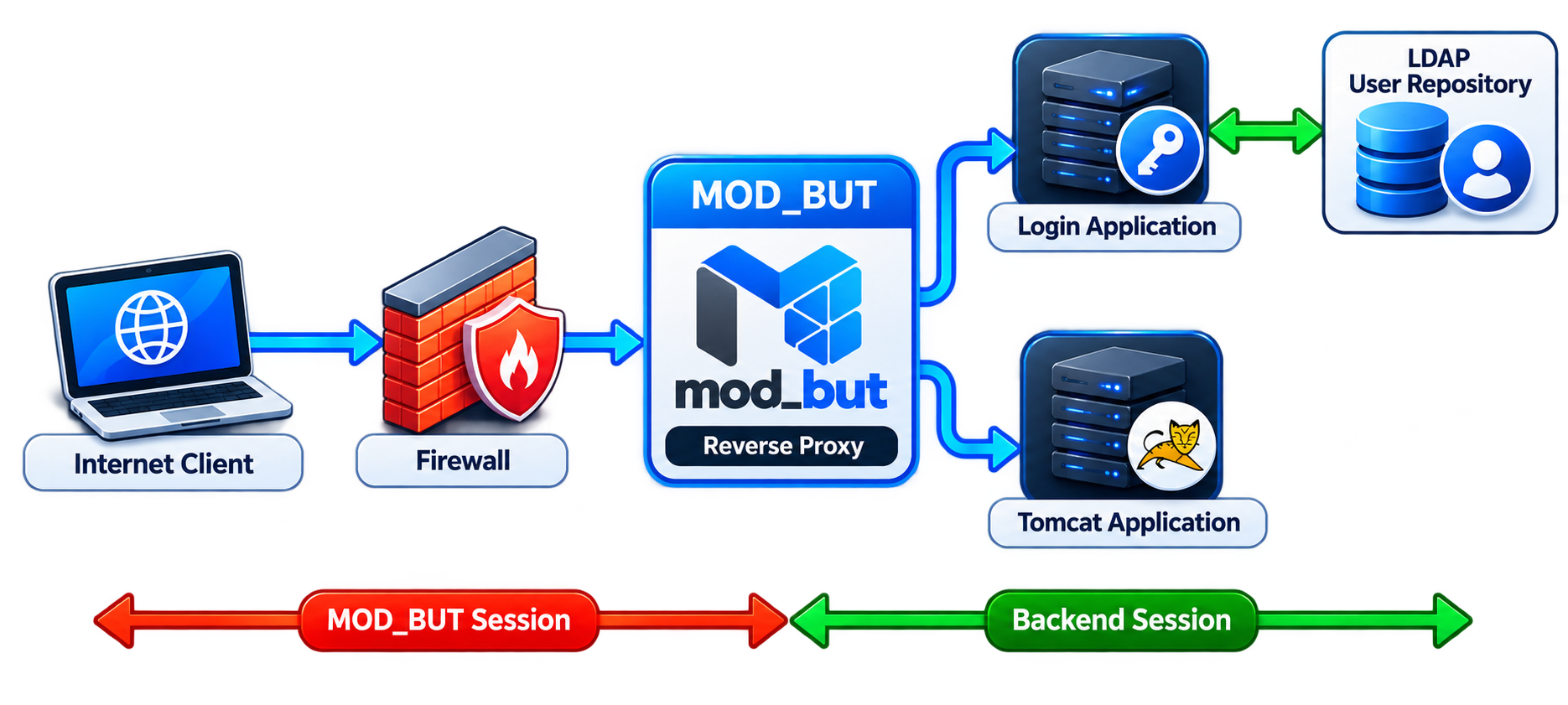
Figure 1 Browser and backend session boundaries. LDAP is an example identity source queried by the login application, not by mod_but.
Features and Capabilities
Session Lifecycle
The browser holds the mod_but session identifier. Backend session cookies remain in shared memory, except cookies explicitly configured for transparent forwarding. Sessions exist before authentication; successful login sets the authentication flag and rotates the identifier. Hard and inactivity timeouts limit the session lifetime. Explicit renewal creates a fresh unauthenticated session.
Example Request Flow
Protected request → cookie_try probe and unauthenticated SHM session → login redirect → authorized LOGON=ok and MOD_BUT_USERNAME response → authentication flag set and session ID rotated → next authenticated request forwards stored backend cookies.
Public URLs and Session Bypass
MOD_BUT_LOGON_REQUIRED Off makes a location public while retaining session creation, cookie-bag handling, and authorized backend commands. Use this for the login application. MOD_BUT_SESSION_FREE_URL bypasses session processing entirely; use it for static assets and local error pages. Login and management-command endpoints must not match that bypass expression.
Backend Cookies and Location Isolation
The cookie bag stores backend cookies such as PHPSESSID and JSESSIONID in shared memory. MOD_BUT_LOCATION_ID separates cookie bags for applications that reuse cookie names. MOD_BUT_SESSION_STORE_FREE_COOKIES allows selected name=value strings to pass between browser and backend. A stored cookie whose value becomes deleted is removed.
Authentication and Authorization
Protected locations require an authenticated session. Optional service-list authorization restricts accessible URLs using a session-specific regular expression. Authentication strength levels 0, 1, and 2 allow locations to require step-up authentication; the login application performs verification and reports the resulting level.
Backend Integration and Delegated Login
mod_but protects HTTP backend applications through Apache reverse proxy configuration. A login application can supply MOD_BUT_USERNAME and delegated backend cookies to support single sign-on. Delegated Login Service integration requires application-specific login logic; mod_but does not verify application credentials itself.
Logout
The configured logout URL can terminate the current session or all sessions for its username. Authorized backend commands can terminate all sessions for a selected user or for the current authenticated user. All affected cookie bags are freed. Terminating gateway sessions does not itself invalidate sessions retained inside a backend application.
Deployment and Cookie Security
Configure mod_but through Apache server, virtual-host, and location directives. Use HTTPS with Secure, HttpOnly, and the appropriate SameSite setting for the master cookie. Shared memory is local to the Apache instance; capacities are set at build time and graceful restarts reset sessions.
Scope and Limitations
mod_but uses Apache 2.x and APR; compatibility depends on the build environment. It provides cookie-based gateway sessions, with no cross-server session replication or persistent session database. It does not provide a graphical administration interface, general-purpose WAF inspection, or TLS-session binding. Alternative session models require application integration.
Minimal Configuration Example
Prerequisites: Apache with mod_but, mod_proxy, mod_proxy_http, and mod_ssl loaded; a TLS certificate and key; and a backend listening on 127.0.0.1:8080 with /login/, /protected/, and /account/password/ routes. Replace the example hostname, certificate paths, and backend routes for your deployment.
<VirtualHost *:443>
    ServerName gateway.example.com
    DocumentRoot /var/www/html
    SSLEngine On
    SSLCertificateFile /etc/ssl/gateway.crt
    SSLCertificateKeyFile /etc/ssl/gateway.key
    ProxyRequests Off

    MOD_BUT_ENABLED On
    MOD_BUT_AUTHORIZATION_ENABLED On
    MOD_BUT_COOKIE_NAME MOD_BUT
    MOD_BUT_COOKIE_PATH /
    MOD_BUT_COOKIE_SECURE On
    MOD_BUT_COOKIE_HTTPONLY On
    MOD_BUT_COOKIE_SAMESITESTRICT On
    MOD_BUT_SESSION_FREE_URL "^/error/|^/favicon\.ico$"
    MOD_BUT_CLIENT_REFUSES_COOKIES_URL /error/refused.html
    MOD_BUT_SESSION_TIMEOUT_URL /error/expired.html
    MOD_BUT_ALL_SHM_SPACE_USED_URL /error/capacity.html
    MOD_BUT_GLOBAL_LOGON_SERVER_URL /login/
    MOD_BUT_GLOBAL_LOGON_AUTH_COOKIE_NAME LOGON
    MOD_BUT_GLOBAL_LOGON_AUTH_COOKIE_VALUE ok
    MOD_BUT_AUTHORIZED_LOGON_URL "^/login/|^/account/password/$"
    MOD_BUT_ENABLED_RETURN_TO_ORIG_URL On
    MOD_BUT_SESSION_DESTROY "^/logout/$"
    MOD_BUT_SESSION_DESTROY_URL /error/logged-out.html
    MOD_BUT_SESSION_DESTROY_ALL_USER_SESSIONS On
    MOD_BUT_LOGOUT_ON_BEHALF_COOKIE_NAME MOD_BUT_LOGOUT
    MOD_BUT_LOGOUT_CURRENT_USER_COOKIE_NAME MOD_BUT_LOGOUT_CURRENT_USER

    <Location /login/>
        MOD_BUT_LOGON_REQUIRED Off
        ProxyPass http://127.0.0.1:8080/login/
        ProxyPassReverse http://127.0.0.1:8080/login/
    </Location>
    <Location /protected/>
        MOD_BUT_LOGON_REQUIRED On
        ProxyPass http://127.0.0.1:8080/protected/
        ProxyPassReverse http://127.0.0.1:8080/protected/
    </Location>
    <Location /account/password/>
        MOD_BUT_LOGON_REQUIRED On
        ProxyPass http://127.0.0.1:8080/account/password/
        ProxyPassReverse http://127.0.0.1:8080/account/password/
    </Location>
</VirtualHost>
After verifying credentials, the login application sends
Set-Cookie: LOGON=ok
Set-Cookie: MOD_BUT_USERNAME=alice
After a successful password change, the password endpoint may send
Set-Cookie: MOD_BUT_LOGOUT_CURRENT_USER=ok
The authorized-URL expression matches the frontend request path; it does not authenticate the backend or grant administrator privileges. The application must enforce its own access checks. With return-to-original enabled, mod_but returns to the requested protected URL after login.
Deployment Verification
Create these local pages under
/var/www/html/error/: refused.html, expired.html, capacity.html, and logged-out.html
Keep these routes outside backend proxy mappings and exempt from session processing.
Verify the deployment:
Run apachectl -t and resolve any configuration errors before reloading Apache.
Open /protected/ in a fresh browser session; confirm the cookie probe and redirect to /login/.
Log in; confirm access to /protected/ and that backend session cookies are absent from browser storage unless explicitly configured as free cookies.
Open a second session for the same user, then request /logout/ from the first session. With the all-user flag On, both sessions must require login again.
Repeat with a successful password change; confirm that the application response is preserved and all sessions for that user lose authenticated access.
List of Configuration Directives
MOD_BUT_ENABLED					Chapter 1.4
MOD_BUT_CLIENT_REFUSES_COOKIES_URL		Chapter 1.5
MOD_BUT_COOKIE_NAME					Chapter 1.6
MOD_BUT_COOKIE_DOMAIN				Chapter 1.6
MOD_BUT_COOKIE_PATH					Chapter 1.6
MOD_BUT_COOKIE_EXPIRATION				Chapter 1.6
MOD_BUT_COOKIE_SECURE				Chapter 1.6
MOD_BUT_COOKIE_HTTPONLY				Chapter 1.6
MOD_BUT_COOKIE_SAMESITESTRICT			Chapter 1.6 New since Version 3.0
MOD_BUT_SESSION_FREE_URL				Chapter 1.7
MOD_BUT_SESSION_TIMEOUT_URL			Chapter 1.7
MOD_BUT_SESSION_RENEW_URL				Chapter 1.7
MOD_BUT_SESSION_HARD_TIMEOUT			Chapter 1.7
MOD_BUT_SESSION_INACTIVITY_TIMEOUT		Chapter 1.7
MOD_BUT_SESSION_DESTROY				Chapter 1.7
MOD_BUT_SESSION_DESTROY_URL			Chapter 1.7
MOD_BUT_SESSION_DESTROY_ALL_USER_SESSIONS	Chapter 1.7 New since Version 3.2
MOD_BUT_SESSION_STORE_FREE_COOKIES		Chapter 1.7
MOD_BUT_URL_AFTER_RENEW				Chapter 1.7

MOD_BUT_ALL_SHM_SPACE_USED_URL			Chapter 1.8

MOD_BUT_AUTHORIZATION_ENABLED			Chapter 1.9
MOD_BUT_GLOBAL_LOGON_SERVER_URL			Chapter 1.9
MOD_BUT_GLOBAL_LOGON_SERVER_URL_1		Chapter 1.9	New since Version 2.8
MOD_BUT_GLOBAL_LOGON_SERVER_URL_2		Chapter 1.9	New since Version 2.8
MOD_BUT_GLOBAL_LOGON_AUTH_COOKIE_NAME		Chapter 1.9
MOD_BUT_GLOBAL_LOGON_AUTH_COOKIE_VALUE		Chapter 1.9
MOD_BUT_AUTHORIZED_LOGON_URL			Chapter 1.9	New since Version 2.0
MOD_BUT_ENABLED_RETURN_TO_ORIG_URL		Chapter 1.9
MOD_BUT_LOGON_SERVER_URL				Chapter 1.10
MOD_BUT_LOGON_REQUIRED				Chapter 1.10

MOD_BUT_SERVICE_LIST_ENABLED			Chapter 1.11	New since Version 2.0
MOD_BUT_SERVICE_LIST_COOKIE_NAME			Chapter 1.11	New since Version 2.0
MOD_BUT_SERVICE_LIST_COOKIE_VALUE		Chapter 1.11	New since Version 2.0
MOD_BUT_SERVICE_LIST_AUTH_ERROR_URL		Chapter 1.11	New since Version 2.0

MOD_BUT_AUTH_STRENGTH				Chapter 1.12	New since Version 2.8

MOD_BUT_LOCATION_ID					Chapter 1.13	New since Version 2.6

MOD_BUT_LOGOUT_CURRENT_USER_COOKIE_NAME		Chapter 1.15 New since Version 3.2
MOD_BUT_LOGOUT_ON_BEHALF_COOKIE_NAME		Chapter 1.15 New since Version 3.2
Enabling mod_but
Enable or disable mod_but for a virtual host.
Context: virtual host
| Key | Parameter | Description |
|---|---|---|
| MOD_BUT_ENABLED | On, Off | Enable mod_but for this virtual host. Default: Off |
Browser Cookie Check
mod_but requires the browser to accept its session cookie. The cookie_try probe checks this before authentication. If the browser refuses cookies, mod_but redirects to the configured error URL.
Context: virtual host
| Key | Parameter | Description |
|---|---|---|
| MOD_BUT_CLIENT_REFUSES_COOKIES_URL | String | URL used when the browser refuses the cookie probe. Include this URL in MOD_BUT_SESSION_FREE_URL. Default: /mod_but/error/refused_cookies.html |
Include the cookie-refusal error URL in MOD_BUT_SESSION_FREE_URL to avoid repeated cookie probes and redirects.
Cookie Settings
These directives control the master session cookie exchanged between the browser and mod_but.
Context: virtual host
| Key | Parameter | Description |
|---|---|---|
| MOD_BUT_COOKIE_NAME | String | Configure cookie name Default: MOD_BUT |
| MOD_BUT_COOKIE_DOMAIN | String | Configure cookie domain Default: not specified |
| MOD_BUT_COOKIE_PATH | String | Configure cookie path Default: / |
| MOD_BUT_COOKIE_EXPIRATION | String | Configure cookie expiration date Default: not specified |
| MOD_BUT_COOKIE_SECURE | On, Off | Configure cookie secure Default: On |
| MOD_BUT_COOKIE_HTTPONLY | On, Off | Prevent JavaScript from reading the master cookie using HttpOnly. Default: On |
| MOD_BUT_COOKIE_SAMESITESTRICT | On, Off | On = SameSite=Strict Off = SameSite = Lax Default: On |
Leave MOD_BUT_COOKIE_EXPIRATION empty for a browser session cookie. HttpOnly prevents JavaScript from reading the cookie; it is supported by current browsers.
Session Settings
Context: virtual host
| Key | Parameter | Description |
|---|---|---|
| MOD_BUT_SESSION_FREE_URL | String | Regular expression matching URLs exempt from session processing. Default: ^/robots\.txt$|^/favicon\.ico$ |
| MOD_BUT_SESSION_HARD_TIMEOUT | Integer | Configure max session time of MOD_BUT (elapsed time). Default: 3600 (seconds) |
| MOD_BUT_SESSION_INACTIVITY_TIMEOUT | Integer | Maximum inactivity in seconds. This timeout and the hard timeout are checked independently. Accepts nonnegative decimal integers. Default: 900 seconds |
| MOD_BUT_SESSION_TIMEOUT_URL | String | Redirect URL for a session that expires during request processing. A response whose session expires during backend processing is rejected with HTTP 401. Default: /mod_but/error/session_expired.html |
| MOD_BUT_SESSION_RENEW_URL | String | Regular expression matching explicit renewal URLs. Creates a fresh unauthenticated session and redirects to MOD_BUT_URL_AFTER_RENEW. Default: ^/renew/ |
| MOD_BUT_SESSION_DESTROY | String | Regular expression matching logout URLs. Deletion follows MOD_BUT_SESSION_DESTROY_ALL_USER_SESSIONS. Default: ^/logout/ |
| MOD_BUT_SESSION_DESTROY_URL | String | Redirect URL after logout through MOD_BUT_SESSION_DESTROY. Default: /mod_but/error/session_destroy.html |
| MOD_BUT_SESSION_STORE_FREE_COOKIES | String | Regular expression matching cookie name=value strings allowed to pass between browser and backend instead of being kept in the cookie bag. Default: ^language=|^trustme= |
| MOD_BUT_SESSION_DESTROY_ALL_USER_SESSIONS | On, Off | On: requesting a URL matching MOD_BUT_SESSION_DESTROY deletes all sessions with the current session's exact MOD_BUT_USERNAME. Without a username, only the current session is deleted. Off: deletes only the current session. The redirect remains MOD_BUT_SESSION_DESTROY_URL. Default: Off Context: server configuration or VirtualHost. |
| MOD_BUT_URL_AFTER_RENEW | String | Redirect URL after explicit renewal through MOD_BUT_SESSION_RENEW_URL. Default: /url_after_renew/ Context: server configuration or VirtualHost. |
Shared Memory Settings
Context: virtual host
| Key | Parameter | Description |
|---|---|---|
| MOD_BUT_ALL_SHM_SPACE_USED_URL | String | Redirect URL when shared-memory capacity is exhausted. Default: /mod_but/error/session_shm_used.html |
Session and cookie capacities are compile-time settings, not Apache directives. Set MOD_BUT_SESSION_COUNT and MOD_BUT_COOKIESTORE_COUNT through compiler -D options and rebuild. The current Makefile uses 10/10 slots for testing; choose appropriate capacities for production. Graceful Apache restarts create fresh SHM generations and reset sessions.
mod_but.h
| Key | Parameter | Description |
|---|---|---|
| MOD_BUT_SESSION_COUNT | Integer | Compile-time session-slot capacity. Header default: 5. The current Makefile overrides this to 10. Increase for the deployment workload and rebuild the module. |
| MOD_BUT_COOKIESTORE_COUNT | Integer | Compile-time cookie-slot capacity, shared across all sessions. Header default: 10. Current Makefile: 10. Increase for the deployment workload and rebuild the module. |
| MOD_BUT_REGEX_MATCH_LIMIT | Integer | Compile-time PCRE backtracking limit. Override with a compiler -D option if needed. Default: 1000000 |
| MOD_BUT_REGEX_RECURSION_LIMIT | Integer | Compile-time PCRE recursion limit. Override with a compiler -D option if needed. Default: 1000 |
Global Authentication and Authorization
Context: Virtual Host
| Key | Parameter | Description |
|---|---|---|
| MOD_BUT_AUTHORIZATION_ENABLED | On, Off | On: enforce authentication for locations with MOD_BUT_LOGON_REQUIRED On. Off: session processing remains enabled, but authentication is not enforced. Default: Off |
| MOD_BUT_GLOBAL_LOGON_SERVER_URL | String | Default login URL, used unless MOD_BUT_LOGON_SERVER_URL overrides it for the current location. Default: /mod_but/login.html |
| MOD_BUT_GLOBAL_LOGON_SERVER_URL_1 | String | Step-up login URL when the location requires strength 1 and the authenticated session has a lower strength. Default: /mod_but/login.html |
| MOD_BUT_GLOBAL_LOGON_SERVER_URL_2 | String | Step-up login URL when the location requires strength 2 and the authenticated session has a lower strength. Default: /mod_but/login.html |
| MOD_BUT_GLOBAL_LOGON_AUTH_COOKIE_NAME | String | Backend command-cookie name used to mark a session authenticated. Accepted only from authorized URLs. Default: LOGON |
| MOD_BUT_GLOBAL_LOGON_AUTH_COOKIE_VALUE | String | Exact value required for the authentication command cookie. Default: ok |
| MOD_BUT_AUTHORIZED_LOGON_URL | String | Regular expression matching request URLs whose backend responses may issue authentication and logout commands. Restrict this to trusted application endpoints. Default: ^/.*$ (all request paths) |
| MOD_BUT_ENABLED_RETURN_TO_ORIG_URL | On, Off | On: return to the originally requested protected URL after successful authentication, preserving its query string. If no original URL is stored, use /. Off: use the backend MOD_BUT_REDIRECT command for the post-login redirect. Default: Off |
Location Authentication and Authorization
Context: location
| Key | Parameter | Description |
|---|---|---|
| MOD_BUT_LOGON_SERVER_URL | String | Defines its own login server URL within a “Location” directive. If set, it overwrites the GLOBAL_LOGON_SERVER_URL Default: not specified |
| MOD_BUT_LOGON_REQUIRED | On, Off | On: require an authenticated session. Off: public access, while session and cookie processing remain active. Use MOD_BUT_SESSION_FREE_URL only to bypass session processing entirely. Default: Off |
Service List Authorization
Service-list authorization restricts which protected URLs an authenticated session may access. Enable MOD_BUT_SERVICE_LIST_ENABLED to apply this check to locations requiring authentication.
The authorized login application can send the configured service-list cookie with a URL regular expression. Without a narrower value, the default expression permits all paths.
Context: Virtual Host
| Key | Parameter | Description |
|---|---|---|
| MOD_BUT_SERVICE_LIST_ENABLED | On, Off | Turns the service list authorization on and off. Default: Off |
| MOD_BUT_SERVICE_LIST_COOKIE_NAME | String | Name of the service list authorization Set-Cookie header. Default: MOD_BUT_SERVICE_LIST |
| MOD_BUT_SERVICE_LIST_COOKIE_VALUE | String | Default URL regular expression for service-list authorization. The login application may replace it for a session, for example ^/webapp/asl/|^/webapp/bsl/. Default: ^/.*$ |
| MOD_BUT_SERVICE_LIST_AUTH_ERROR_URL | String | This value configures the error page URL, if the user is authenticated but unauthorized for requesting a certain URL. Default: /mod_but/error/authorization_error.html |
Authentication Strength
A location can require a minimum authentication strength:
    <Location /mod_but/protected>
        ProxyPass http://127.0.0.1:8080/mod_but/protected/
        ProxyPassReverse http://127.0.0.1:8080/mod_but/protected/
            MOD_BUT_LOGON_REQUIRED  On
            MOD_BUT_AUTH_STRENGTH       1
    </Location>
New sessions start with strength 0. The login application can assert these levels after verifying the user:
AUTH_STRENGTH=0 lowest strength; authentication still required on protected URLs
AUTH_STRENGTH=1 username/password authentication
AUTH_STRENGTH=2 strong authentication
If MOD_BUT_AUTH_STRENGTH is omitted from a location, its required strength is 0. Authentication is still required when MOD_BUT_LOGON_REQUIRED is On. Configure level 1 or 2 only when the corresponding login application verifies that level.
The authorized login application can send MOD_BUT_AUTH_STRENGTH=0, 1 or 2 together with LOGON=ok. Invalid backend values reset strength to 0. Locations require a minimum strength through the Apache MOD_BUT_AUTH_STRENGTH directive. An authenticated user below that level is redirected to MOD_BUT_GLOBAL_LOGON_SERVER_URL_1 or _2. These levels are assertions by the login application; mod_but does not perform password or second-factor verification itself.
Context: location or directory
| Key | Parameter | Description |
|---|---|---|
| MOD_BUT_AUTH_STRENGTH | Integer | Required session strength: 0, 1 or 2. Apache rejects invalid configuration values. Strength 0 does not bypass authentication when MOD_BUT_LOGON_REQUIRED is On. Default: 0 |
Backend Application Session Handling
Use MOD_BUT_LOCATION_ID to separate backend cookie bags when applications use the same cookie name, such as JSESSIONID.
Applications with different location IDs can retain independent backend sessions. Applications sharing an ID share that cookie scope.
Context: location or directory
| Key | Parameter | Description |
|---|---|---|
| MOD_BUT_LOCATION_ID | Integer | Nonnegative decimal location ID used to isolate backend cookie bags. Cookie names can be reused across different IDs. Default: 0 |
Example of two backend applications with separate cookie scopes:

    <Location /cms>
            ProxyPass                           http://127.0.0.1:36060/cms/
            ProxyPassReverse                    http://127.0.0.1:36060/cms/
            MOD_BUT_LOGON_REQUIRED  On
            MOD_BUT_LOCATION_ID             1
    </Location>

    <Location /smstool>
            ProxyPass                           http://127.0.0.1:36070/smstool/
            ProxyPassReverse                    http://127.0.0.1:36070/smstool/
            MOD_BUT_LOGON_REQUIRED  Off
            MOD_BUT_LOCATION_ID             2
    </Location>
A JSESSIONID stored for /cms at location ID 1 is not injected into requests for /smstool at location ID 2.
Locations without an explicit MOD_BUT_LOCATION_ID use ID 0.
Delegated Login Service
The login application uses these Set-Cookie response headers to authenticate a session and optionally establish delegated backend sessions. Required and optional fields are distinguished below.
| Cookie Name | Cookie Value | Occurrence | Comment |
|---|---|---|---|
| LOGON | ok | Required for login | Successful authentication command. The name and exact value are configurable; defaults are LOGON and ok. Accepted only from authorized URLs. |
| MOD_BUT_USERNAME | <username> | Recommended for user identity | Send with successful authentication to identify the user. Required for user-wide logout commands. Stored in the cookie bag and injected into backend requests for its location ID. |
| MOD_BUT_AUTH_STRENGTH | 0, 1 or 2 | Optional | Authentication strength accompanying LOGON=ok. Accepts 0, 1 or 2; invalid values reset strength to 0. |
| MOD_BUT_SERVICE_LIST | String (regexp) | Optional when enabled | Defines the URLs, for which the user is authorized. |
| MOD_BUT_BACKEND_SESSION | bname=<string> ; bvalue=<string> ; bclearance=<int> ; | Optional for delegated login | bname = backend cookie name bvalue= backend cookie value bclearance = backend LOCATION_ID clearance |
| MOD_BUT_REDIRECT | Local URL | Optional | Post-login redirect when MOD_BUT_ENABLED_RETURN_TO_ORIG_URL is Off. With return-to-original On, the stored original URL is used instead. |
For a delegated backend cookie, bclearance selects the MOD_BUT_LOCATION_ID under which it is stored. Ordinary backend cookies use the location ID of the request that received them. In the example, the delegated cookie is injected only into backend requests using location ID 1. Replace the example session value with the actual backend session identifier obtained by the login application.
Example authorized response with a delegated backend session:
Set-Cookie: LOGON=ok
Set-Cookie: MOD_BUT_USERNAME=alice
Set-Cookie: MOD_BUT_AUTH_STRENGTH=1
Set-Cookie: MOD_BUT_REDIRECT=/protected/
Set-Cookie: MOD_BUT_BACKEND_SESSION=bname=PHPSESSID; bvalue=example-session-id; bclearance=1
Backend Logout Commands
Applications communicate logout commands through Set-Cookie response headers. MOD_BUT_AUTHORIZED_LOGON_URL defines the request URL pattern allowed to issue these commands; this is the same authorization used for LOGON=ok. Both commands delete all matching sessions and cookie bags under the module mutex. Management cookies are consumed rather than forwarded to the browser. Path=/ is optional. Authorization matches the frontend request path, not a backend hostname or an administrator role. Limit the expression to trusted application routes and enforce administrator access within the application.
| Trigger | Identity source | Sessions removed | Result |
|---|---|---|---|
| /logout/ URL | Current session username | Current session by default; all matching sessions when the all-user flag is On | Redirect to configured logout URL |
| Administrative cookie | Username in cookie value | All sessions for the supplied username | Application response preserved |
| Current-user cookie | Authenticated username already in SHM | All sessions for the current user | Application response preserved |
| Key | Parameter | Description |
|---|---|---|
| MOD_BUT_LOGOUT_ON_BEHALF_COOKIE_NAME | String | Name of the authorized backend command cookie. Its value is the exact username whose sessions and cookie bags are deleted. Default: LOGOUT Example: MOD_BUT_LOGOUT_ON_BEHALF_COOKIE_NAME MOD_BUT_LOGOUT Response: Set-Cookie: MOD_BUT_LOGOUT=alice |
| MOD_BUT_LOGOUT_CURRENT_USER_COOKIE_NAME | String | Name of the authorized current-user command cookie. The exact value ok deletes all sessions for the username already in the authenticated SHM session. Default: MOD_BUT_LOGOUT_CURRENT_USER Response: Set-Cookie: MOD_BUT_LOGOUT_CURRENT_USER=ok |
Both command-cookie names are server or VirtualHost settings. Empty or oversized administrative target usernames are rejected.
Current-user logout requires an existing authenticated session with one unambiguous username. Send MOD_BUT_LOGOUT_CURRENT_USER=ok after the password change succeeds; all sessions for that stored username are removed. Invalid values, missing authentication or identity, and replacement of the issuer’s username in the same response return HTTP 502 and roll back changes. LOGON=ok in that response cannot authenticate an otherwise unauthenticated logout. Expired or removed sessions return HTTP 401. Successful logout preserves the application response and redirect.
Migration: MOD_BUT_LOGOUT_ON_BEHALF_COOKIE_VALUE has been removed. Remove it from Apache configurations; each administrative command now supplies the target username as its cookie value.
Diagnostics and Testing
Use LogLevel but:debug for module-specific diagnostics. Current logs avoid recording session IDs and backend cookie values. Protect diagnostic logs and use test accounts during troubleshooting.
LogLevel but:debugShared Memory Inspector
The Linux CLI in tools/shm-info reads the session and cookie SHM segments without changing them. Run it in Apache's IPC namespace with permission to read the segments. Find current IDs using ipcs -m; IDs change after restart. Supply the running Apache timeout values to assess expiry. The snapshot is best effort and does not acquire the Apache mutex. Build it for Linux using the same layout header and architecture as the running module; a macOS binary cannot run in the Linux container.
# From the repository root, with Docker running:
./tools/shm-info/build-and-run.sh
# Use the current IDs printed above:
./tools/shm-info/build-and-run.sh \
  --sessions-shmid 0 --cookies-shmid 1 \
  --hard-timeout 18800 --idle-timeout 300
The wrapper builds the Linux inspector, builds missing images or module artifacts, starts the test container if needed, and copies the inspector into it. Replace the example IDs and timeouts with the running values. Occupied and authenticated session totals include allocated slots that may already be expired. When timeouts are supplied, the distinct authenticated-user count excludes expired or structurally invalid sessions. The inspector reports usernames and integrity findings without printing session IDs or cookie values. See tools/shm-info/README.md for details.
Release Regression Tests
From the repository root, run ./tests/run-regression.sh with Docker running. The runner builds the module and inspector, runs helper checks and integration suites in disposable containers, and retains logs, results.tsv and JUnit results.xml under tests/results/. It does not change the running Docker Compose environment or release binaries. A failed or skipped check returns a nonzero exit status. See tests/README.md for options and tests/COVERAGE.md for coverage.
./tests/run-regression.sh
./tests/run-regression.sh --suite current-user-logout